There are no items in your cart
Add More
Add More
| Item Details | Price | ||
|---|---|---|---|
Description:
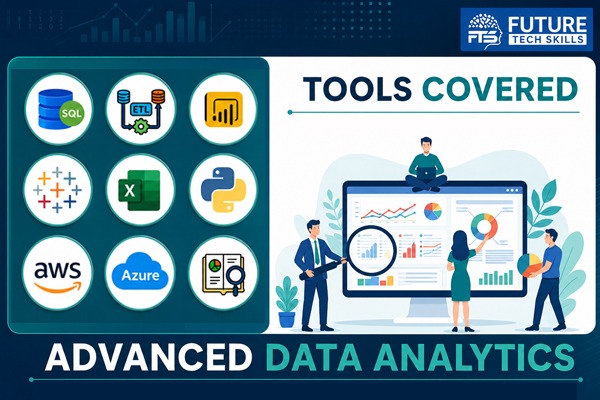
The Advanced Data Analytics program prepares candidates for high-demand careers by mastering data analysis, visualization, and machine learning. With these skills, you'll drive data-driven decisions, increase employability in top industries, and unlock growth opportunities in the fast-evolving world of analytics. .
Key Highlights:
What you will learn:
| Topic | Duration | |
|---|---|---|
| 1 | Introduction to Database & Importance of Database | 10 Minutes |
| 2 | How to Download & Install Database | 10 Minutes |
| 3 | How to Launch SSMS & Connect Database | 5 Minutes |
| 4 | Create Database | 5 Minutes |
| 5 | Database Objects and Data Types | 30 Minutes |
| 6 | Data Handlings as per Data Type | 25 Minutes |
| 7 | About Table & Create Table | 15 Minutes |
| 8 | Insert Data In Table with Both Syntax | 30 Minutes |
| 9 | Select Statement with All Columns and Specific Columns | 30 Minutes |
| 10 | Practice with Update & Delete | 30 Minutes |
| 11 | Top & Distinct Keywords | 30 Minutes |
| 12 | Order By & Order by with Multiple Columns | 30 Minutes |
| 13 | Practice with Where Clause | 15 Minutes |
| 14 | Practice with AND, OR & BETWEEN | 45 Minutes |
| 15 | Practice with LIKE | 20 Minutes |
| 16 | Practice with NOT, IN & Alias | 30 Minutes |
| 17 | Wildcard Characters | 30 Minutes |
| 18 | Working with | 60 Minutes |
| 19 | Aggregate Functions | 30 Minutes |
| 20 | About Group By and Why We Use It? | 30 Minutes |
| 21 | Practice with Group By | 150 Minutes |
| 22 | Practice with Group By with Multiple Columns | 60 Minutes |
| 23 | Unions and Realtime Use of Unions | 150 Minutes |
| 24 | About Joins & Type of Joins | 25 Minutes |
| 25 | Inner Join and Realtime Use of Inner Join | 60 Minutes |
| 26 | Left Join and Realtime Use of Left Join | 60 Minutes |
| 27 | Right Join and Realtime Use of Right Join | 60 Minutes |
| 28 | Full Join and Realtime Use of Full Join | 60 Minutes |
| 29 | Cross Join and Realtime Use of Cross Join | 60 Minutes |
| 30 | Self Join and Realtime Use of Self Join | 90 Minutes |
| 21 | Practice with Group By | 150 Minutes |
| 22 | Practice with Group By with Multiple Columns | 60 Minutes |
| 23 | Unions and Realtime Use of Unions | 150 Minutes |
| 24 | About Joins & Type of Joins | 25 Minutes |
| 25 | Inner Join and Realtime Use of Inner Join | 60 Minutes |
| 26 | Left Join and Realtime Use of Left Join | 60 Minutes |
| 27 | Right Join and Realtime Use of Right Join | 60 Minutes |
| 28 | Full Join and Realtime Use of Full Join | 60 Minutes |
| 29 | Cross Join and Realtime Use of Cross Join | 60 Minutes |
| 30 | Self Join and Realtime Use of Self Join | 90 Minutes |
| 31 | Practice with Joins with 3 Tables | 60 Minutes |
| 32 | Practice with Joins with 4 Tables | 60 Minutes |
| 33 | About Constraints, Type of Constraints | 10 Minutes |
| 34 | Constraints in Detail with Realtime Use | 150 Minutes |
| 35 | Operations on a Table | 60 Minutes |
| 36 | Date Functions and Realtime Use | 120 Minutes |
| 37 | Handling Nulls and Practice with Example | 60 Minutes |
| 38 | System Functions and Realtime Use | 90 Minutes |
| 39 | What is Case Statement and Why We Use It | 15 Minutes |
| 40 | Practice with Case Statement with Multiple Examples | 120 Minutes |
| 41 | Sub Query & Co-related Sub Query | 100 Minutes |
| 42 | Get nth Position Record Using Sub Query | 60 Minutes |
| 43 | Exist & Not Exist and Its Realtime Use | 60 Minutes |
| 44 | Common Table Expression | 120 Minutes |
| 45 | Find Duplicate Records & Find Unique Records | 30 Minutes |
| 46 | Find nth Position Records | 30 Minutes |
| 47 | Find Latest Records, Find Oldest Records & Remove Duplicate Records | 90 Minutes |
| 48 | Working with Row_Number(), Rank() & Dense Rank() Functions | 60 Minutes |
| 49 | What is Index and Why We Use It | 20 Minutes |
| 50 | Type of Index, Create Index, Drop Index, Realtime Use of Index | 120 Minutes |
| 51 | About Views, Create View and Practice with It | 95 Minutes |
| 52 | About Store Procedures | 10 Minutes |
| 53 | Type of Store Procedures and Realtime Use of These | 120 Minutes |
| 54 | About Functions, Type of Functions & Practice with Functions | 90 Minutes |
| 55 | About Trigger, Realtime Use of Trigger and Practice with Trigger | 60 Minutes |
| 56 | Practice on SQL Query Preparation on Business Scenarios-1 | 60 Minutes |
| 57 | Practice on SQL Query Preparation on Business Scenarios-2 | 60 Minutes |
| 58 | Practice on SQL Query Preparation on Business Scenarios-3 | 60 Minutes |
| 59 | Practice on SQL Query Preparation on Business Scenarios-4 | 60 Minutes |
| 60 | Practice on SQL Query Preparation on Business Scenarios-5 | 60 Minutes |
| 61 | Assignment #1 | |
| 62 | Assignment #2 | |
| 63 | Assignment #3 | |
| 64 | Assignment #4 | |
| 65 | Assignment #5 |
| Topic | Duration | |
|---|---|---|
| 1 | What is ETL | 10 Minutes |
| 2 | Importance of ETL | 15 Minutes |
| 3 | What is Datawarehouse | 15 Minutes |
| 4 | Importance of Datawarehouse | 15 Minutes |
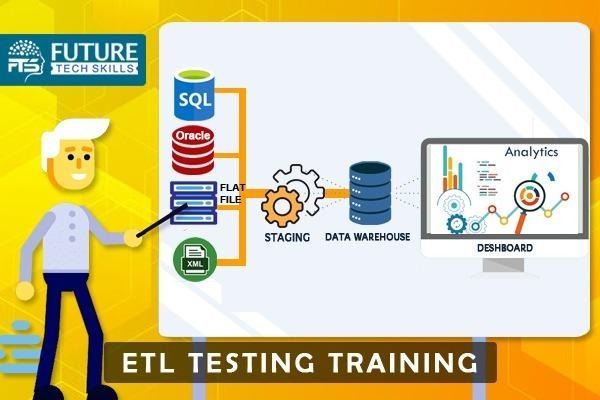
| 5 | ETL Architecture | 20 Minutes |
| 6 | Transformation, Lookup | 25 Minutes |
| 7 | Duplicate Data, Data Cleaning | 60 Minutes |
| 8 | Source, Staging, Target | 15 Minutes |
| 9 | Type of Schemas in Datawarehouse | 10 Minutes |
| 10 | Star Schema | 15 Minutes |
| 11 | Snowflake Schema | 15 Minutes |
| 12 | About DIM Tables and Types | 15 Minutes |
| 13 | SCD Type 1 | 15 Minutes |
| 14 | SCD Type 2 | 15 Minutes |
| 15 | SCD Type 3 | 15 Minutes |
| 16 | SCD Type 4 | 15 Minutes |
| 17 | SCD Type 6 | 15 Minutes |
| 18 | About FACTs and Type of FACTs | 15 Minutes |
| 19 | Additive Fact | 15 Minutes |
| 20 | Semi Additive Fact | 15 Minutes |
| 21 | Non Additive Fact | 15 Minutes |
| 22 | Factless Fact | 15 Minutes |
| 23 | End to End Practice at Project | 120 Minutes |
| Assignment #1 | ||
| Assignment #2 | ||
| Assignment #3 |
| Topic | Duration | |||
|---|---|---|---|---|
| Module 1: Introduction to Power BI (Basics) | ||||
| 1 | Session-1: Overview of Business Intelligence and Power BI | 15 Minutes | ||
| 2 | Topic-1: What is Power BI and why use it? | |||
| 3 | Topic-2: Power BI ecosystem (Desktop, Service, Mobile, Report Server) | |||
| 4 | Session-2: Installing Power BI Desktop | 15 Minutes | ||
| 5 | Topic-1: System requirements | |||
| 6 | Topic-2: Initial setup and configurations | |||
| 7 | Session-3: Understanding the Power BI Interface | 15 Minutes | ||
| 8 | Topic-1: Ribbon, Panes, and Views | |||
| 9 | Topic-2: Different types of views: Report, Data, and Model view | |||
| 10 | Session-4: Connecting to Data Sources | 60 Minutes | ||
| 11 | Topic-1: Importing data from Excel, CSV, and databases | |||
| 12 | Topic-2: Connecting to online services (SharePoint, Azure, etc.) | |||
| 13 | Session-5: Data Transformation with Power Query | 45 Minutes | ||
| 14 | Topic-1: Introduction to Power Query Editor | |||
| 15 | Topic-2: Data cleaning and shaping (removing columns, renaming, filtering, etc.) | |||
| 16 | Session-6: Merging and Appending Data | 30 Minutes | ||
| 17 | Topic-1: Combining multiple data sources | |||
| 18 | Topic-2: Using “Append Queries” and “Merge Queries” | |||
| 19 | Session-7: Data Modeling Basics | 30 Minutes | ||
| 20 | Topic-1: Understanding relationships between tables | |||
| 21 | Topic-2: Cardinality and cross-filter direction | |||
| 22 | Session-8: Creating Basic Visualizations | 45 Minutes | ||
| 23 | Topic-1: Creating charts (bar, line, pie, etc.) | |||
| 24 | Topic-2: Tables and Matrix visuals | |||
| Module 2: Power BI Intermediate Topics | ||||
| 25 | Session-9: Calculated Columns and Measures | 60 Minutes | ||
| 26 | Topic-1: Creating calculated columns | |||
| 27 | Topic-2: Introduction to DAX (Data Analysis Expressions) | |||
| 28 | Topic-3: Basic measures (sum, average, etc.) | |||
| 29 | Session-10: Advanced Data Transformations in Power Query | 60 Minutes | ||
| 30 | Topic-1: Advanced transformations (pivot/unpivot, custom columns) | |||
| 31 | Topic-2: Grouping data and aggregating | |||
| 32 | Session-11: Time Intelligence in Power BI | 30 Minutes | ||
| 33 | Topic-1: Using DAX for time-based calculations (YTD, MTD, etc.) | |||
| 34 | Topic-2: Working with date tables | |||
| 35 | Session-12: Hierarchies and Drill-downs | 20 Minutes | ||
| 36 | Topic-1: Creating and using hierarchies (time, geography, etc.) | |||
| 37 | Topic-2: Enabling drill-down and drill-through capabilities in reports | |||
| 38 | Session-13: Advanced Visualizations | 40 Minutes | ||
| 39 | Topic-1: Customizing visualizations | |||
| 40 | Topic-2: Using slicers, filters, and bookmarks | |||
| 41 | Session-14: Formatting and Themes | 30 Minutes | ||
| 42 | Topic-1: Custom formatting options for visuals and reports | |||
| 43 | Topic-2: Applying custom report themes | |||
| 44 | Session-15: Introduction to Power BI Service | 15 Minutes | ||
| 45 | Topic-1: Publishing reports to Power BI Service | |||
| 46 | Topic-2: Creating and sharing dashboards in Power BI Service | |||
| 47 | Session-16: Row-Level Security (RLS) | 20 Minutes | ||
| 48 | Topic-1: Setting up row-level security | |||
| 49 | Topic-2: Managing user roles and permissions | |||
| 50 | Session-17: Working with Power BI Mobile App | 25 Minutes | ||
| 51 | Topic-1: Optimizing reports for mobile viewing | |||
| 52 | Topic-2: Navigation and interaction in the mobile app | |||
| Module 3: Advanced Power BI | ||||
| 53 | Session-18: Advanced DAX Functions | 30 Minutes | ||
| 54 | Topic-1: CALCULATE, ALL, RELATED, and other advanced DAX functions | |||
| 55 | Topic-2: Context in DAX (Row and Filter context) | |||
| 56 | Session-19: Using Parameters and What-if Analysis | 15 Minutes | ||
| 57 | Topic-1: Creating and using parameters in reports | |||
| 58 | Topic-2: Implementing What-if scenarios | |||
| 59 | Session-20: Advanced Data Modeling Techniques | 60 Minutes | ||
| 60 | Topic-1: Star schema vs Snowflake schema | |||
| 61 | Topic-2: Fact and dimension tables | |||
| 62 | Session-21: Advanced Analytics in Power BI | 20 Minutes | ||
| 63 | Topic-1: Forecasting and clustering | |||
| 64 | Topic-2: Using quick insights for advanced analytics | |||
| 65 | Session-22: Power BI Performance Optimization | 25 Minutes | ||
| 66 | Topic-1: Improving report performance | |||
| 67 | Topic-2: Best practices for data modeling | |||
| 68 | Session-23: Power BI Dataflows | 15 Minutes | ||
| 69 | Topic-1: Understanding and creating dataflows | |||
| 70 | Topic-2: Using dataflows for ETL processes | |||
| 71 | Session-24: Paginated Reports in Power BI | 20 Minutes | ||
| 72 | Topic-1: Creating and deploying paginated reports | |||
| 73 | Topic-2: Differences between paginated and regular reports | |||
| 74 | Session-25: Power BI and AI Integration | 25 Minutes | ||
| 75 | Topic-1: Using AI visuals (Key Influencers, Decomposition Tree) | |||
| 76 | Topic-2: Integration with Azure Machine Learning | |||
| 77 | Session-26: Integrating Power BI with Other Tools | 60 Minutes | ||
| 78 | Topic-1: Power BI and Excel integration | |||
| 79 | Topic-2: Power BI and SharePoint/Teams integration | |||
| 80 | Session-27: Power BI Gateways | 30 Minutes | ||
| 81 | Topic-1: Setting up an on-premise data gateway | |||
| 82 | Topic-2: Scheduling data refreshes with gateways | |||
| Module 4: Power BI Expert Topics | ||||
| 83 | Session-28: Custom Visuals Development | 30 Minutes | ||
| 84 | Topic-1: Importing and using custom visuals from the marketplace | |||
| 85 | Topic-2: Developing custom visuals using Power BI SDK | |||
| 86 | Session-29: Power BI API and Embedding | 60 Minutes | ||
| 87 | Topic-1: Introduction to Power BI API | |||
| 88 | Topic-2: Embedding Power BI reports into applications (web, desktop) | |||
| 89 | Session-30: Advanced Power BI Service Features | 30 Minutes | ||
| 90 | Topic-1: Data lineage and impact analysis | |||
| 91 | Topic-2: Advanced sharing and collaboration in workspaces | |||
| 92 | Session-31: Advanced Power Query – M Language | 60 Minutes | ||
| 93 | Topic-1: Introduction to M Language | |||
| 94 | Topic-2: Writing custom M scripts for data transformation | |||
| 95 | Session-32: Deployment Pipelines | 30 Minutes | ||
| 96 | Topic-1: Creating deployment pipelines for Dev, Test, Prod environments | |||
| 97 | Session-33: Power BI Administration | 30 Minutes | ||
| 98 | Topic-1: Admin roles and permissions in Power BI | |||
| Topic | Duration | |||
|---|---|---|---|---|
| Module 1: Basics of Tableau | ||||
| 1 | Session 1: Introduction to Tableau | 60 Minutes | ||
| 2 | Topic-1: What is Tableau and its importance | |||
| 3 | Topic-2: Tableau interface and workspace | |||
| 4 | Topic-3: Different Tableau products (Desktop, Public, Online, Server, Reader) | |||
| 5 | Session 2: Data Connection | 60 Minutes | ||
| 6 | Topic-1: Connecting to different data sources (Excel, SQL Server, CSV, etc.) | |||
| 7 | Topic-2: Importing data and managing connections | |||
| 8 | Topic-3: Live vs Extract connection | |||
| 9 | Session 3: Data Preparation | 90 Minutes | ||
| 10 | Topic-1: Data cleaning, filtering, and sorting | |||
| 11 | Topic-2: Handling null values | |||
| 12 | Topic-3: Data types and roles (Dimension, Measure) | |||
| 13 | Topic-4: Creating hierarchies, groups, sets, and bins | |||
| 14 | Topic-5: Joins, blends, and unions | |||
| Module 2: Basic Visualization Techniques | ||||
| 15 | Session 4: Simple Charts | 60 Minutes | ||
| 16 | Topic-1: Bar chart, Line chart, Pie chart, Scatter plot | |||
| 17 | Topic-2: Creating and modifying charts | |||
| 18 | Topic-3: Dual-axis and combined charts | |||
| 19 | Session 5: Filtering and Sorting | 45 Minutes | ||
| 20 | Topic-1: Applying filters (dimension filters, measure filters) | |||
| 21 | Topic-2: Sorting data in visualizations | |||
| 22 | Topic-3: Interactive filters for users | |||
| 23 | Session 6: Calculated Fields | 60 Minutes | ||
| 24 | Topic-1: Basic arithmetic and logical calculations | |||
| 25 | Topic-2: String and date calculations | |||
| 26 | Topic-3: Introduction to Tableau’s calculation syntax | |||
| Module 3: Intermediate Visualization | ||||
| 27 | Session 7: Table Calculations | 60 Minutes | ||
| 28 | Topic-1: Basic table calculations (Running Total, Percent of Total) | |||
| 29 | Topic-2: Quick Table Calculations (Moving Average, YTD growth) | |||
| 30 | Session 8: Mapping | 60 Minutes | ||
| 31 | Topic-1: Creating maps with geographical data | |||
| 32 | Topic-2: Customizing maps (adding layers, map styles) | |||
| 33 | Topic-3: Heat maps, density maps, symbol maps | |||
| 34 | Session 9: Dashboards | 120 Minutes | ||
| 35 | Topic-1: Building dashboards with multiple visualizations | |||
| 36 | Topic-2: Creating interactive dashboards (actions, filters) | |||
| 37 | Topic-3: Using layout containers for responsive design | |||
| 38 | Topic-4: Best practices for effective dashboard design | |||
| 39 | Session 10: Storytelling | 60 Minutes | ||
| 40 | Topic-1: Creating and organizing stories | |||
| 41 | Topic-2: Adding captions, annotations, and filters to stories | |||
| 42 | Topic-3: Story best practices for business reporting | |||
| Module 4: Advanced Tableau | ||||
| 43 | Session 11: Advanced Calculations | 60 Minutes | ||
| 44 | Topic-1: LOD Expressions (Fixed, Include, Exclude) | |||
| 45 | Topic-2: Advanced table calculations (Rank, Index, Window Functions) | |||
| 46 | Topic-3: Conditional and nested calculations | |||
| 47 | Session 12: Advanced Visualizations | 60 Minutes | ||
| 48 | Topic-1: Bullet charts, Box plots, Waterfall charts, Gantt charts | |||
| 49 | Topic-2: Motion charts, Sparklines, Word clouds | |||
| 50 | Topic-3: Advanced mapping techniques (Path maps, Spider maps) | |||
| 51 | Session 13: Parameters | 60 Minutes | ||
| 52 | Topic-1: Creating and using parameters in calculations | |||
| 53 | Topic-2: Parameter controls in dashboards | |||
| 54 | Topic-3: Dynamic visualizations using parameters | |||
| 55 | Session 14: Data Modeling | 60 Minutes | ||
| 56 | Topic-1: Relationships in Tableau (physical layer vs logical layer) | |||
| 57 | Topic-2: Performance optimization (Extracts, Aggregations, Context Filters) | |||
| Module 5: Data Interaction and Integration | ||||
| 58 | Session 15: Data Blending | 60 Minutes | ||
| 59 | Topic-1: Combining data from multiple sources | |||
| 60 | Topic-2: Managing data relationships | |||
| 61 | Topic-3: Handling blended data issues | |||
| 62 | Session 16: Tableau Prep | 60 Minutes | ||
| 63 | Topic-1: Introduction to Tableau Prep for data preparation | |||
| 64 | Topic-2: Workflow creation in Tableau Prep | |||
| 65 | Topic-3: Cleaning, shaping, and transforming data with Prep | |||
| 66 | Session 17: Tableau Server & Tableau Online | 60 Minutes | ||
| 67 | Topic-1: Publishing workbooks to Tableau Server/Tableau Online | |||
| 68 | Topic-2: Managing permissions and user roles | |||
| 69 | Topic-3: Scheduling data refreshes and alerts | |||
| Module 6: Best Practices and Performance Tuning | ||||
| 70 | Session 18: Performance Optimization | 15 Minutes | ||
| 71 | Topic-1: Using Extracts vs Live Connections | |||
| 72 | Topic-2: Optimization techniques (minimize calculations, data extracts, filtering) | |||
| 73 | Topic-3: Understanding Tableau’s Performance Recording tool | |||
| 74 | Session 19: Design Best Practices | 30 Minutes | ||
| 75 | Topic-1: Choosing the right chart for the right data | |||
| 76 | Topic-2: Building user-friendly dashboards | |||
| 77 | Topic-3: Using color, text, and layout effectively | |||
| Project | ||||
| 78 | Practice on Realtime Project-1 | 90 Minutes | ||
| 79 | Practice on Realtime Project-2 | 90 Minutes | ||
| 80 | Practice on Realtime Project-3 | 90 Minutes | ||
| 81 | Practice on Realtime Project-4 | 90 Minutes | ||
| 82 | Practice on Realtime Project-5 | 90 Minutes | ||
| Topic | Duration | |||
|---|---|---|---|---|
| Module 1: Basics of Excel | ||||
| 1 | Session 1: Introduction to Excel (Basics) | 60 Minutes | ||
| 2 | Understanding the Excel Interface | |||
| 3 | Workbook, Worksheets, Rows, Columns, and Cells | |||
| 4 | Data Entry, Editing, and Formatting | |||
| 5 | Keyboard Shortcuts for Efficiency | |||
| 6 | Saving, Opening, and Printing Excel Files | |||
| 7 | Session 2: Formatting Excel Worksheets | 60 Minutes | ||
| 8 | Cell Formatting (Fonts, Colors, Borders, Alignment) | |||
| 9 | Conditional Formatting (Color Scales, Data Bars, Custom Rules) | |||
| 10 | Applying and Customizing Themes | |||
| 11 | Working with Tables (Table Styles, Quick Formatting) | |||
| 12 | Session 3: Data Manipulation & Organization | 60 Minutes | ||
| 13 | Sorting and Filtering Data | |||
| 14 | Data Validation (Creating Drop-Down Lists) | |||
| 15 | Removing Duplicates | |||
| 16 | Grouping and Subtotaling Data | |||
| 17 | Custom Number Formatting | |||
| 18 | Session 4: Functions and Formulas (Intermediate) | 120 Minutes | ||
| 19 | Mathematical and Statistical Functions (SUM, AVERAGE, COUNT, COUNTA, etc.) | |||
| 20 | Logical Functions (IF, AND, OR, NOT) | |||
| 21 | Lookup and Reference Functions (VLOOKUP, HLOOKUP, INDEX, MATCH) | |||
| 22 | Text Functions (CONCATENATE, LEFT, RIGHT, MID, TRIM, LEN) | |||
| 23 | Date and Time Functions (TODAY, NOW, DATEDIF, EDATE) | |||
| 24 | Session 5: PivotTables and PivotCharts | 120 Minutes | ||
| 25 | Creating and Customizing PivotTables | |||
| 26 | Using Filters, Slicers, and Timelines in PivotTables | |||
| 27 | Grouping Data in PivotTables | |||
| 28 | PivotCharts: Visualization of PivotTable Data | |||
| 29 | Calculated Fields in PivotTables | |||
| 30 | Session 6: Data Visualization with Excel | 120 Minutes | ||
| 31 | Creating and Customizing Charts (Bar, Line, Pie, Combo) | |||
| 32 | Sparklines and Mini Charts | |||
| 33 | Creating Heat Maps and Data Bars | |||
| 34 | Advanced Chart Techniques (Dual-Axis Charts, Customizing Labels) | |||
| 35 | Dynamic Charts Using Data Validation Lists | |||
| 36 | Session 7: Advanced Formulas and Functions | 120 Minutes | ||
| 37 | Advanced Lookup (XLOOKUP, INDIRECT, OFFSET) | |||
| 38 | Array Formulas and Dynamic Arrays (FILTER, SORT, UNIQUE) | |||
| 39 | Financial Functions (NPV, IRR, PMT) | |||
| 40 | Error Handling Functions (IFERROR, ISERROR, IFNA) | |||
| 41 | Session 8: Data Analysis Tools | 60 Minutes | ||
| 42 | What-If Analysis (Goal Seek, Data Tables, Scenario Manager) | |||
| 43 | Solver Tool (Optimization) | |||
| 44 | Descriptive Statistics Using Data Analysis Toolpak | |||
| 45 | Using Power Query for Data Import and Transformation | |||
| 46 | Session 9: Macros and Automation | 120 Minutes | ||
| 47 | Introduction to Macros and VBA (Recording Macros) | |||
| 48 | Editing and Customizing Macros (Basic VBA Code) | |||
| 49 | Creating Buttons and Assigning Macros | |||
| 50 | Automating Repetitive Tasks with Macros | |||
| 51 | Session 10: Collaboration and Sharing | 60 Minutes | ||
| 52 | Protecting Worksheets and Workbooks (Password Protection) | |||
| 53 | Sharing and Collaborating on Excel Workbooks | |||
| 54 | Track Changes and Version History | |||
| 55 | Co-authoring in Excel | |||
| 56 | Session 11: PowerPivot and Power BI Integration | 60 Minutes | ||
| 57 | Introduction to PowerPivot | |||
| 58 | Creating Data Models with PowerPivot | |||
| 59 | DAX (Data Analysis Expressions) Functions | |||
| 60 | Excel to Power BI Integration | |||
| Project | ||||
| 61 | Practice on Realtime Project-1 | 90 Minutes | ||
| 62 | Practice on Realtime Project-2 | 90 Minutes | ||
| 63 | Practice on Realtime Project-3 | 90 Minutes | ||
| 64 | Practice on Realtime Project-4 | 90 Minutes | ||
| 65 | Practice on Realtime Project-5 | 90 Minutes | ||
| Topic | Duration | |||
|---|---|---|---|---|
| Module 1: Introduction to Statistics and Probability | ||||
| 1 | Session-1: Descriptive Statistics | 35 Minutes | ||
| 2 | Types of Data: Qualitative vs. Quantitative | |||
| 3 | Measures of Central Tendency (Mean, Median, Mode) | |||
| 4 | Measures of Dispersion (Variance, Standard Deviation, Range, Interquartile Range) | |||
| 5 | Shape of Distribution: Skewness, Kurtosis | |||
| 6 | Visualizations: Histogram, Boxplot, Bar chart | |||
| 7 | Session-2: Introduction to Probability | 20 Minutes | ||
| 8 | Basics of Probability | |||
| 9 | Probability Rules (Addition and Multiplication Rules) | |||
| 10 | Conditional Probability and Bayes’ Theorem | |||
| 11 | Independence vs. Dependence | |||
| 12 | Session-3: Combinatorics | 25 Minutes | ||
| 13 | Permutations and Combinations | |||
| 14 | Applications in Probability | |||
| Module 2: Probability Distributions | ||||
| 15 | Session-4: Discrete Probability Distributions | 30 Minutes | ||
| 16 | Bernoulli Distribution | |||
| 17 | Binomial Distribution | |||
| 18 | Poisson Distribution | |||
| 19 | Geometric Distribution | |||
| 20 | Session-5: Continuous Probability Distributions | 20 Minutes | ||
| 21 | Normal Distribution (Properties and Empirical Rule) | |||
| 22 | Uniform Distribution | |||
| 23 | Exponential Distribution | |||
| 24 | Session-6: Sampling Distributions | 25 Minutes | ||
| 25 | Law of Large Numbers | |||
| 26 | Central Limit Theorem | |||
| 27 | Understanding the Concept of Sampling Distribution of a Statistic (Mean, Proportion) | |||
| Module 3: Inferential Statistics | ||||
| 28 | Session-7: Point Estimation and Confidence Intervals | 20 Minutes | ||
| 29 | Estimating Population Parameters | |||
| 30 | Confidence Intervals for Means and Proportions | |||
| 31 | Session-8: Hypothesis Testing | 60 Minutes | ||
| 32 | Null and Alternative Hypotheses | |||
| 33 | Type I and Type II Errors | |||
| 34 | p-Values and Significance Level (α) | |||
| 35 | Z-test, T-test (1-sample, 2-sample, Paired t-tests) | |||
| 36 | Chi-Square Test for Independence | |||
| 37 | ANOVA (Analysis of Variance) | |||
| 38 | Session-9: Non-Parametric Tests | 15 Minutes | ||
| 39 | Wilcoxon Rank-Sum Test | |||
| 40 | Kruskal-Wallis Test | |||
| 41 | Mann-Whitney U Test | |||
| Module 4: Advanced Probability and Statistics | ||||
| 42 | Session-10: Bayesian Statistics | 30 Minutes | ||
| 43 | Introduction to Bayesian Thinking | |||
| 44 | Bayesian Inference | |||
| 45 | Prior, Likelihood, Posterior | |||
| 46 | Session-11: Markov Chains | 30 Minutes | ||
| 47 | Introduction to Markov Processes | |||
| 48 | Transition Matrix and State Probability | |||
| 49 | Applications in Time Series and Random Processes | |||
| Module 5: Regression and Predictive Modeling | ||||
| 54 | Session-13: Simple Linear Regression | 30 Minutes | ||
| 55 | Line of Best Fit | |||
| 56 | Coefficients and Interpretation | |||
| 57 | Residual Analysis and Assumptions of Regression | |||
| 58 | Session-14: Multiple Linear Regression | 30 Minutes | ||
| 59 | Multiple Predictors | |||
| 60 | Variance Inflation Factor (VIF) and Multicollinearity | |||
| 61 | Model Evaluation: R-squared, Adjusted R-squared, AIC/BIC | |||
| 62 | Session-15: Logistic Regression | 30 Minutes | ||
| 63 | Odds Ratio and Log Odds | |||
| 64 | Maximum Likelihood Estimation (MLE) | |||
| 65 | ROC Curve, AUC, Precision-Recall | |||
| Module 6: Time Series Analysis | ||||
| 66 | Session-16: Introduction to Time Series Data | 30 Minutes | ||
| 67 | Components of Time Series: Trend, Seasonality, Noise | |||
| 68 | Stationarity and Differencing | |||
| 69 | Session-17: Time Series Forecasting Models | 30 Minutes | ||
| 70 | Moving Averages and Exponential Smoothing | |||
| 71 | ARIMA (AutoRegressive Integrated Moving Average) | |||
| 72 | Seasonal Decomposition of Time Series (STL) | |||
| 73 | Time Series in Python | |||
| 74 | Plotting and Decomposing Time Series Data | |||
| 75 | Building ARIMA Models and Forecasting | |||
| Module 7: Applied Probability in Machine Learning | ||||
| 76 | Session-18: Decision Trees and Random Forests | 30 Minutes | ||
| 77 | Gini Index and Entropy | |||
| 78 | Understanding Feature Importance | |||
| 79 | Session-19: Naive Bayes Classifier | 30 Minutes | ||
| 80 | Theoretical Foundation | |||
| 81 | Multinomial, Gaussian, and Bernoulli Naive Bayes | |||
| 82 | Session-20: Probabilistic Graphical Models | 30 Minutes | ||
| 83 | Introduction to Bayesian Networks | |||
| 84 | Inference and Prediction using PGMs | |||
| Module 8: Data Testing & Quality Assurance with Statistics | ||||
| 85 | Session-21: AB Testing | 30 Minutes | ||
| 86 | Experimental Design | |||
| 87 | Hypothesis Testing for Business Decisions | |||
| 88 | Session-22: Data Validation Techniques | 30 Minutes | ||
| 89 | Detecting Anomalies in Data | |||
| 90 | Statistical Quality Control | |||
| 91 | Application of Control Charts | |||
| 92 | Session-23: Statistical Modeling for ETL Processes | 30 Minutes | ||
| 93 | Outlier Detection | |||
| 94 | Data Profiling using Statistical Methods | |||
| Topic | Duration | |
|---|---|---|
| 1 | Module 1: Introduction to Python for Data Analytics | |
| 2 | Session-1: Installation: Install Python, Jupyter Notebook, and essential libraries | 40 Minutes |
| 3 | Session-2: Basic Python Syntax: Variables, data types, conditionals, loops, functions | 120 Minutes |
| 4 | Module 2: Data Handling with Pandas | |
| 5 | Session-3: Basic Operation - Loading data from CSV, Excel, databases | 60 Minutes |
| 6 | Session-4: Basic Operation - Inspecting the dataset: df.head(), df.info(), df.describe() | 60 Minutes |
| 7 | Session-5: Basic Operation - Selecting and filtering data | 30 Minutes |
| 8 | Session-6: Basic Operation - Adding and removing columns: df['new_col'] = df['old_col'] * 2, df.drop('col', axis=1) |
30 Minutes |
| 9 | Session-7: Data Cleaning - Handling missing data: df.fillna(), df.dropna() | 60 Minutes |
| 10 | Session-8: Data Cleaning - String operations: df['column'].str.lower(), df['column'].str.replace() | 60 Minutes |
| 11 | Module 3: Data Manipulation | |
| 12 | Session-9: Grouping and Aggregation: groupby(), agg(), sum(), mean() | 60 Minutes |
| 13 | Session-10: Merging and Joining: Combining data with merge(), concat() | 60 Minutes |
| 14 | Session-11: Pivot Tables: Creating pivot tables | 30 Minutes |
| 15 | Module 4: Exploratory Data Analysis (EDA) | |
| 16 | Session-12: Visualization with Matplotlib and Seaborn: Basic plotting | 45 Minutes |
| 17 | Session-13: Visualization with Matplotlib and Seaborn: Scatter plots, bar charts, histograms | 60 Minutes |
| 18 | Session-14: Summary Statistics: Mean, median, mode | 60 Minutes |
| 19 | Session-15: Summary Statistics: Correlation matrix | 30 Minutes |
| 20 | Module 5: Advanced Data Manipulation | |
| 21 | Session-16: Multi-indexing: Handling multi-level indexing in dataframes | 45 Minutes |
| 22 | Session-17: Reshaping Data: Using melt() and stack() to reshape datasets |
60 Minutes |
| 23 | Module 6: Feature Engineering | |
| 24 | Session-18: Dealing with Date and Time Data: Parsing dates, extracting year, month, day | 90 Minutes |
| 25 | Session-19: Dealing with Date and Time Data: Handling time series data | 60 Minutes |
| 26 | Session-20: Handling Categorical Data: Encoding categorical variables using pd.get_dummies() | 85 Minutes |
| 27 | Module 7: Introduction to Machine Learning | |
| 28 | Session-21: Supervised Learning: Linear Regression | 60 Minutes |
| 29 | Session-22: Supervised Learning: Classification with Logistic Regression, Decision Trees | 60 Minutes |
| 30 | Session-23: Unsupervised Learning: K-means Clustering | 60 Minutes |
| 31 | Module 8: Model Evaluation | |
| 32 | Session-24: Train/Test Split: Splitting data into training and test sets | 60 Minutes |
| 33 | Session-25: Model Metrics: Evaluating models using accuracy, precision, recall, F1-score | 60 Minutes |
| 34 | Module 9: Data Pipelines and Automation | |
| 35 | Session-26: Building Pipelines with Sklearn: Automating data transformation and model fitting | 60 Minutes |
| 36 | Module 10: Working with Large Datasets | |
| 37 | Session-27: Optimizing Pandas for Large Datasets: Loading chunks, working with dask or modin | 60 Minutes |
| 38 | End to End Practice at Realtime Project | 120 Minutes |
| Topic | Duration | |||
|---|---|---|---|---|
| Understanding the Business Problem | ||||
| 1 | Gathering Requirements | 60 Minutes | ||
| 2 | Framing the Problem | |||
| 3 | Identifying Metrics | |||
| Data Collection and Exploration | ||||
| 4 | Clean the Data | 60 Minutes | ||
| 5 | Explore the Data | |||
| Generating Insights | ||||
| 6 | Identifying Trends | |||
| 7 | Finding Correlations | |||
| 8 | Performing Analysis | |||
| Storytelling and Presenting Insights | ||||
| 9 | Create a Narrative | 60 Minutes | ||
| 10 | Use Visuals | |||
| 11 | Tailor the Presentation | |||
| Driving Actionable Recommendations | ||||
| 12 | Strategic Actions | 60 Minutes | ||
| 13 | Measurable Impact | |||
| Continuous Monitoring and Feedback | ||||
| 14 | Track Key Metrics | 60 Minutes | ||
| 15 | Iterate | |||
| Case Study: Solving Low Customer Retention | ||||
| 16 | Problem | 120 Minutes | ||
| 17 | Data Collection | |||
| 18 | Exploration | |||
| 19 | Insight | |||
| 20 | Recommendation | |||
| 21 | Outcome Monitoring | |||
| Topic | Duration | |
|---|---|---|
| 1 | Introduction to Big Data Analytics | 120 Minutes |
| 2 | Big Data Ecosystem | 60 Minutes |
| 3 | ETL (Extract, Transform, Load) in Big Data | 120 Minutes |
| 4 | Data Analysis Techniques | 90 Minutes |
| 5 | Big Data Analytics with SQL | 135 Minutes |
| 6 | Real-Time Data Processing with Apache Kafka | 90 Minutes |
| 7 | Visualization of Big Data | 60 Minutes |
| 8 | Machine Learning on Big Data | 60 Minutes |
| 9 | Final Project: Analyzing a Big Dataset | 60 Minutes |
| Topic | Duration | |
|---|---|---|
| 1 | Introduction to AWS Cloud Analytics | 120 Minutes |
| 2 | Amazon Redshift | 90 Minutes |
| 3 | Amazon Athena | 120 Minutes |
| 4 | AWS Glue | 120 Minutes |
| 5 | Amazon Kinesis | 120 Minutes |
| 6 | Amazon QuickSight | 120 Minutes |
| 7 | Amazon EMR (Elastic MapReduce) | 120 Minutes |
| 8 | End to End Practice | 120 Minutes |
| Topic | Duration | |
|---|---|---|
| 1 | Module 1: Introduction to Azure Cloud Analytics | |
| 2 | Session-1 - Azure Data Lake Storage (ADLS) | 60 Minutes |
| 3 | Session-2 - Azure Synapse Analytics | 60 Minutes |
| 4 | Session-3 - Azure Databricks | 60 Minutes |
| 5 | Session-4 - Azure Machine Learning | 60 Minutes |
| 6 | Session-5 - Azure Stream Analytics | 60 Minutes |
| 7 | Module 2: Setting up Azure Data Lake Storage (ADLS) | |
| 8 | Session-6 - Create an ADLS account | 60 Minutes |
| 9 | Session-7 - Ingesting Data | 25 Minutes |
| 10 | Session-8 - Managing Data | 60 Minutes |
| 11 | Module 3: Azure Synapse Analytics (formerly SQL Data Warehouse) | |
| 12 | Session-9 - Create a Synapse workspace | 60 Minutes |
| 13 | Session-10 - Ingest Data | 20 Minutes |
| 14 | Session-11 - Querying Data | 35 Minutes |
| 15 | Session-12 - Integrated Power BI | 60 Minutes |
| 16 | Module 4: Azure Databricks for Big Data Processing | |
| 17 | Session-13 - Set up Azure Databricks | 60 Minutes |
| 18 | Session-14 - ETL with Databricks | 60 Minutes |
| 19 | Session-15 - Machine Learning in Databricks | 60 Minutes |
| 20 | Module 5: Azure Machine Learning for Advanced Analytics | |
| 21 | Session-16 - Create an Azure ML workspace | 60 Minutes |
| 22 | Session-17 - Training Models | 60 Minutes |
| 23 | Session-18 - Deployment | 60 Minutes |
| 24 | Module 6: Real-time Analytics with Azure Stream Analytics | |
| 25 | Session-19 - Set up Stream Analytics Job | 60 Minutes |
| 26 | Session-20 - Data Ingestion | 60 Minutes |
| 27 | Session-21 - Defining Queries | 60 Minutes |
| 28 | Module 7: Power BI for Visualization | 60 Minutes |
| 29 | Session-22 - Connect Power BI to Azure Services | 60 Minutes |
| 30 | Session-23 - Building Reports | 60 Minutes |
| 31 | End to End practice at project | 120 Minutes |
| Topic | Duration | |
|---|---|---|
| 1 | Module 1: Introduction to Business Case Studies | |
| 2 | What is a Business Case Study? | 40 Minutes |
| 3 | Purpose of Case Study Analysis | 30 Minutes |
| 4 | Module 2: Types of Business Case Studies | |
| 5 | Exploratory Case Studies | 30 Minutes |
| 6 | Descriptive Case Studies | 30 Minutes |
| 7 | Explanatory Case Studies | 30 Minutes |
| 8 | Cumulative Case Studies | 30 Minutes |
| 9 | Critical Instance Case Studies | 30 Minutes |
| 10 | Module 3: Steps in Analyzing a Business Case Study | 120 Minutes |
| 11 | Step 1: Read the Case Thoroughly | |
| 12 | Step 2: Identify Key Issues | |
| 13 | Step 3: Conduct a SWOT Analysis | |
| 14 | Step 4: Analyze the Data | |
| 15 | Step 5: Develop and Evaluate Alternatives | |
| 16 | Step 6: Recommend Solutions | |
| 17 | Step 7: Implementation Plan | |
| 18 | Module 4: Frameworks for Case Study Analysis | 125 Minutes |
| 19 | Porter’s Five Forces: Competitive analysis. | |
| 20 | PESTLE Analysis: Macro-environmental factors (Political, Economic, Social, Technological, Legal, Environmental). |
|
| 21 | BCG Matrix: Product portfolio management. | |
| 22 | Value Chain Analysis: Examining internal business operations for efficiency. |
|
| 23 | VRIO Analysis: Resources and capabilities that provide competitive advantage (Value, Rarity, Imitability, Organization). |
|
| 24 | Module 5: Real-World Business Case Examples | 68 Minutes |
| 25 | Example 1: Apple’s Innovation Strategy | |
| 26 | Example 2: Starbucks Global Expansion | |
| 27 | Module 6: Tools for Case Study Analysis | 30 Minutes |
| 28 | Microsoft Excel/Google Sheets | |
| 29 | Miro/Lucidchart | |
| 30 | Presentation Software | |
| 31 | Module 7: Writing a Case Study Report | 60 Minutes |
| 32 | Executive Summary | |
| 33 | Background Information | |
| 34 | Problem Definition | |
| 35 | Data Analysis | |
| 36 | Recommendations | |
| 37 | Implementation Plan | |
| 38 | Conclusion: Recap | |
| 39 | Module 8: Tips for Effective Case Study Analysis | |
| 40 | Be Objective | |
| 41 | Think Like a Consultant | |
| 42 | Ask Questions | |
| 43 | Use Evidence |
| Topic | Duration | |
|---|---|---|
| 1 | How to Prepare Good CV? | 15 Minutes |
| 2 | Prepare Impressive CV | 30 Minutes |
| 3 | Update Profile at LinkedIn, Naukri & Monster with All Required Keywords | 30 Minutes |
| Topic | Duration | |
|---|---|---|
| 1 | How to crack Interview for Data Analyst profile? | 15 Minutes |
| 2 | Interview Preparation - Session 1 | 60 Minutes |
| 3 | Interview Preparation - Session 2 | 60 Minutes |
| 4 | Interview Preparation - Session 3 | 60 Minutes |
| 5 | Interview Preparation - Session 4 | 60 Minutes |
| 6 | Interview Preparation - Session 5 | 60 Minutes |
| 7 | Interview Preparation - Session 6 | 60 Minutes |
| 8 | Interview Preparation - Session 7 | 60 Minutes |
| 9 | Interview Preparation - Session 8 | 60 Minutes |
| 10 | Interview Preparation - Session 9 | 60 Minutes |
| 11 | Interview Preparation - Session 10 | 60 Minutes |
| 12 | Interview Preparation - Session 11 | 60 Minutes |
| 13 | Interview Preparation - Session 12 | 60 Minutes |
| 14 | Interview Preparation - Session 13 | 60 Minutes |
| 15 | Interview Preparation - Session 14 | 60 Minutes |
| 16 | Interview Preparation - Session 15 | 60 Minutes |
| 17 | Interview Preparation - Session 16 | 60 Minutes |
| 18 | Interview Preparation - Session 17 | 60 Minutes |
| 19 | Interview Preparation - Session 18 | 60 Minutes |
| 20 | Interview Preparation - Session 19 | 60 Minutes |
| 21 | Interview Preparation - Session 20 | 60 Minutes |
| 22 | Interview Preparation - Session 21 | 60 Minutes |
| 23 | Interview Preparation - Session 22 | 60 Minutes |
| 24 | Interview Preparation - Session 23 | 60 Minutes |
| 25 | Interview Preparation - Session 24 | 60 Minutes |
| 26 | Interview Preparation - Session 25 | 60 Minutes |
After successful purchase, this item would be added to your Library.
You can access the library in the following ways :